顯示具有 Delegate 標籤的文章。 顯示所有文章

2022年4月20日 星期三

c# socket server, client, delegate, thread


using System;

using System.Collections.Generic;

using System.Net;

using System.Net.Sockets;

using System.Text;

using System.Threading;

using System.Windows.Forms;


namespace SocketTestApp

{

    public partial class SocketTest : Form

    {

        //建立一個和客戶端通訊的套接字

        Socket SocketWatch = null;

        //定義一個集合,儲存客戶端資訊

        Dictionary<string, Socket> ClientConnectionItems = new Dictionary<string, Socket> { };


        public SocketTest()

        {

            InitializeComponent();

        }


        private void button1_Click(object sender, EventArgs e)

        {

            //埠號(用來監聽的)

            int port = 6000;


            //string host = "127.0.0.1";

            //IPAddress ip = IPAddress.Parse(host);

            IPAddress ip = IPAddress.Any;


            //將IP地址和埠號繫結到網路節點point上 

            IPEndPoint ipe = new IPEndPoint(ip, port);


            //定義一個套接字用於監聽客戶端發來的訊息,包含三個引數(IP4定址協議,流式連線,Tcp協議) 

            SocketWatch = new Socket(AddressFamily.InterNetwork, SocketType.Stream, ProtocolType.Tcp);

            //監聽繫結的網路節點 

            SocketWatch.Bind(ipe);

            //將套接字的監聽佇列長度限制為20 

            SocketWatch.Listen(20);


            //負責監聽客戶端的執行緒:建立一個監聽執行緒 

            Thread threadwatch = new Thread(ServerWatchConnecting);

            //將窗體執行緒設定為與後臺同步,隨著主執行緒結束而結束 

            threadwatch.IsBackground = true;

            //啟動執行緒   

            threadwatch.Start();


            Console.WriteLine("開啟監聽......");

            Console.WriteLine("點選輸入任意資料回車退出程式......");

            richTextBox1.AppendText("開啟監聽......");

            /*

            Console.ReadKey();


            SocketWatch.Close();

            */

        }


        //監聽客戶端發來的請求 

        void ServerWatchConnecting()

        {

            Socket connection = null;


            //持續不斷監聽客戶端發來的請求   

            while (true)

            {

                try

                {

                    connection = SocketWatch.Accept();

                }

                catch (Exception ex)

                {

                    //提示套接字監聽異常   

                    Console.WriteLine(ex.Message);

                    break;

                }


                //客戶端網路結點號 

                string remoteEndPoint = connection.RemoteEndPoint.ToString();

                //新增客戶端資訊 

                ClientConnectionItems.Add(remoteEndPoint, connection);


                string strTotalMsg = "\r\n[客戶端\"" + remoteEndPoint + "\"建立連線成功! 客戶端數量:" + ClientConnectionItems.Count + "]";


                this.Invoke((MethodInvoker)delegate

                {

                    lock (this.listBox1)

                        listBox1.Items.Add(remoteEndPoint);

                });


                //顯示與客戶端連線情況

                Console.WriteLine(strTotalMsg);


                //獲取客戶端的IP和埠號 

                IPAddress clientIP = (connection.RemoteEndPoint as IPEndPoint).Address;

                int clientPort = (connection.RemoteEndPoint as IPEndPoint).Port;


                //讓客戶顯示"連線成功的"的資訊 

                string sendmsg = "[" + "本地IP:" + clientIP + " 本地埠:" + clientPort.ToString() + " 連線服務端成功!]";

                byte[] arrSendMsg = Encoding.UTF8.GetBytes(sendmsg);

                connection.Send(arrSendMsg);


                this.Invoke((MethodInvoker)delegate

                {

                    lock (this.richTextBox1)

                        this.richTextBox1.AppendText(strTotalMsg);

                });


                //建立一個通訊執行緒   

                Thread thread = new Thread(ServerRecv);

                //啟動執行緒   

                thread.Start(connection);

            }

        }


        void ServerRecv(object socket_obj)

        {

            Socket socketServer = socket_obj as Socket;


            while (true)

            {

                //建立一個記憶體緩衝區,其大小為1024*1024位元組 即1M   

                byte[] arrServerRecMsg = new byte[1024 * 1024];

                //將接收到的資訊存入到記憶體緩衝區,並返回其位元組陣列的長度  

                try

                {

                    int length = socketServer.Receive(arrServerRecMsg);

                    if (length == 0)

                        continue;

                    //將機器接受到的位元組陣列轉換為人可以讀懂的字串   

                    string strSRecMsg = Encoding.UTF8.GetString(arrServerRecMsg, 0, length);


                    string strTotalMsg = "\r\n[客戶端:" + socketServer.RemoteEndPoint + " 時間:" + DateTime.Now.ToString("yyyy-MM-dd HH:mm:ss:fff") + "]\r\n" + strSRecMsg;


                    this.Invoke((MethodInvoker)delegate

                    {

                        lock (this.richTextBox1)

                            this.richTextBox1.AppendText(strTotalMsg);

                    });


                    //將傳送的字串資訊附加到文字框txtMsg上   

                    Console.WriteLine(strTotalMsg);


                    //Thread.Sleep(3000);

                    //socketServer.Send(Encoding.UTF8.GetBytes("[" + socketServer.RemoteEndPoint + "]:"+strSRecMsg));

                    //傳送客戶端資料

                    if (ClientConnectionItems.Count > 0)

                    {

                        foreach (var socketTemp in ClientConnectionItems)

                        {

                            socketTemp.Value.Send(Encoding.UTF8.GetBytes("[" + socketServer.RemoteEndPoint + "]:" + strSRecMsg));

                        }

                    }

                }

                catch (Exception)

                {

                    listBox1.Items.Remove(socketServer.RemoteEndPoint.ToString());

                    ClientConnectionItems.Remove(socketServer.RemoteEndPoint.ToString());

                    //提示套接字監聽異常 

                    Console.WriteLine("\r\n[客戶端\"" + socketServer.RemoteEndPoint + "\"已經中斷連線! 客戶端數量:" + ClientConnectionItems.Count + "]");

                    //關閉之前accept出來的和客戶端進行通訊的套接字 

                    socketServer.Close();

                    break;

                }

            }

        }

        private void button4_Click(object sender, EventArgs e)

        {

            if (ClientConnectionItems.Count > 0)

            {

                foreach (var socketTemp in ClientConnectionItems)

                {

                    for(int cnt =0; cnt < listBox1.SelectedItems.Count; cnt++)

                    {

                        foreach (var item in listBox1.SelectedItems)

                        {

                            if (item.ToString() == socketTemp.Key)

                            {

                                socketTemp.Value.Send(Encoding.UTF8.GetBytes("[Msg from server]:" + textBox2.Text));

                            }

                        }

                    }


                }

            }


        }


        //建立1個客戶端套接字和1個負責監聽服務端請求的執行緒 

        Thread ThreadClient = null;

        Socket SocketClient = null;


        private void button2_Click(object sender, EventArgs e)

        {


            try

            {

                int port = 6000;

                //string host = "127.0.0.1";//伺服器端ip地址

                string host = textBox_target_ip.Text;


                IPAddress ip = IPAddress.Parse(host);

                IPEndPoint ipe = new IPEndPoint(ip, port);


                //定義一個套接字監聽 

                SocketClient = new Socket(AddressFamily.InterNetwork, SocketType.Stream, ProtocolType.Tcp);


                try

                {

                    //客戶端套接字連線到網路節點上,用的是Connect 

                    SocketClient.Connect(ipe);

                }

                catch (Exception)

                {

                    Console.WriteLine("連線失敗!\r\n");

                    Console.ReadLine();

                    return;

                }


                ThreadClient = new Thread(ClientRecv);

                ThreadClient.IsBackground = true;

                ThreadClient.Start();


                Thread.Sleep(1000);

                Console.WriteLine("請輸入內容<按Enter鍵傳送>:\r\n");

                while (true)

                {

                    string sendStr = Console.ReadLine();

                    ClientSendMsg(sendStr);

                }


                //int i = 1;

                //while (true)

                //{

                //  Console.Write("請輸入內容:");

                //  string sendStr = Console.ReadLine();


                //  Socket clientSocket = new Socket(AddressFamily.InterNetwork,ProtocolType.Tcp);

                //  clientSocket.Connect(ipe);

                //  //send message

                //  //byte[] sendBytes = Encoding.ASCII.GetBytes(sendStr);

                //  byte[] sendBytes = Encoding.GetEncoding("utf-8").GetBytes(sendStr);


                //  //Thread.Sleep(4000);


                //  clientSocket.Send(sendBytes);


                //  //receive message

                //  string recStr = ""; 

                //  byte[] recBytes = new byte[4096];

                //  int bytes = clientSocket.Receive(recBytes,recBytes.Length,0);

                //  //recStr += Encoding.ASCII.GetString(recBytes,bytes);

                //  recStr += Encoding.GetEncoding("utf-8").GetString(recBytes,bytes);

                //  Console.WriteLine(recStr);


                //  clientSocket.Close();

                //  if (i >= 100)

                //  {

                //    break;

                //  }

                //  i++;

                //}


                //Console.ReadLine();

                //return;


                //string result = String.Empty;


            }

            catch (Exception ex)

            {

                Console.WriteLine(ex.Message);

                Console.ReadLine();

            }

        }


        //接收服務端發來資訊的方法  

        public void ClientRecv()

        {

            int x = 0;

            //持續監聽服務端發來的訊息 

            while (true)

            {

                try

                {

                    //定義一個1M的記憶體緩衝區,用於臨時性儲存接收到的訊息 

                    byte[] arrRecvmsg = new byte[1024 * 1024];


                    //將客戶端套接字接收到的資料存入記憶體緩衝區,並獲取長度 

                    int length = SocketClient.Receive(arrRecvmsg);


                    //將套接字獲取到的字元陣列轉換為人可以看懂的字串 

                    string strRevMsg = Encoding.UTF8.GetString(arrRecvmsg, 0, length);

                    if (x == 1)

                    {

                        string strTotalMsg = "\r\n伺服器:" + DateTime.Now.ToString("yyyy-MM-dd HH:mm:ss:fff") + "\r\n" + strRevMsg + "\r\n";

                        Console.WriteLine(strTotalMsg);

                        this.Invoke((MethodInvoker)delegate

                        {

                            lock (this.richTextBox2)

                                this.richTextBox2.AppendText(strTotalMsg);

                        });

                    }

                    else

                    {

                        string strTotalMsg = strRevMsg + "\r\n";


                        Console.WriteLine(strTotalMsg);

                        this.Invoke((MethodInvoker)delegate

                        {

                            lock (this.richTextBox2)

                                this.richTextBox2.AppendText(strTotalMsg);

                        });

                        x = 1;

                    }

                }

                catch (Exception ex)

                {

                    Console.WriteLine("遠端伺服器已經中斷連線!" + ex.Message + "\r\n");

                    break;

                }

            }

        }


        //傳送字元資訊到服務端的方法 

        public void ClientSendMsg(string sendMsg)

        {

            //將輸入的內容字串轉換為機器可以識別的位元組陣列   

            byte[] arrClientSendMsg = Encoding.UTF8.GetBytes(sendMsg);

            //呼叫客戶端套接字傳送位元組陣列   

            SocketClient.Send(arrClientSendMsg);

        }


        private void button3_Click(object sender, EventArgs e)

        {

            ClientSendMsg(textBox1.Text);

        }

    }

}


2022年3月17日 星期四

C# 委派 (Delegate) 函數指標

 Introduction

委派可以看成方法的指標,利用委派可以間接叫用方法。

委派通常主要應用於兩方面:

  1. 事件的驅動
  2. 兩個處理程序間互相呼叫(Call Back)。


Example

使用委派的三個步驟:

  1. 宣告委派型別。
  • [ public | protected | private ] delegate 回傳值型態 委派名稱 ( 參數群 )

    2.    實體化委派型別並指向相對應方法。

  • 建立委派物件實體時,必須要傳入符合委派規格的方法參考

    3.    使用 Invoke 方法叫用委派。

    另外  : 如果要將新的方法的位置參考加入到委派物件的執行方法清單的話,必須透過 「+=」 關鍵字。

sample1

委派的基本操作


class Program {

        //step1:宣告委派型別。
        public delegate void MyDelegate(string name);

        static void Main(string[] args) {
            //step2:實體化委派型別並指向相對應方法。
            //      MyDelegate 委派,為沒有傳回值,
            //      並且傳入參數為一個字串型別。
            MyDelegate oMyDel = new MyDelegate(Show);

            //.net 2.0 之後可以簡化。
            MyDelegate oYourDel = Show;

            //將方法加入委派物件的執行方法清單中
            oYourDel += new MyDelegate(Show2);

            //step3 : 使用 Invoke 方法叫用委派。
            oMyDel.Invoke("MyHello!");
            oYourDel.Invoke("YourHello!");

            //也可簡化。
            oMyDel("MyHello!");
            oYourDel("YourHello!");

          
            Console.ReadKey();
        }

        public static void Show(string value) {
            Console.WriteLine("Show : {0}",value);
        }

        public static void Show2(string value) {
            Console.WriteLine("Show2 : {0}",value);
        }
    }

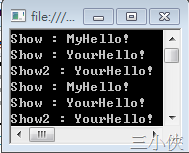
結果

tmp


sample2

匿名方法 (Anonymous method) 是 .net 2.0 的新功能,當執行委派所指定的方法是一些名稱不太重要的

方法時,可以省略方法名稱。


///不使用匿名方法
public delegate MyShow(string m);

public void show(string value){
   MessageBox.show(value);	
}

private void Form1_Load(object sender,EventArgs e){
   MyShow oMyDel = show;
   oMyDel.Invoke("不使用匿名方法");
}


///使用匿名方法
public delegate void MyShow(string m)

private void Form1_Load(object sender,EventArts e){
     MyShow oMyDel = delegate(string m){
          MessageBox.Show(m); 
     };
     oMyDel.Invoke("使用匿名方法");
}


sample3

多重傳送委派  是單一事件引發多個事件,利用 「-」與「+」號完成委派的新增與刪除。

其中,以下兩個方法得到的結果會是一樣的。


//直接加方法
del d = method1;
d = d + method2;
d.Invoke();

//直接加委派
del d1 = method1;
del d2 = method2;
d1 += d2;
d1.Invoke();


public delegate void Del();

        private static void Show() {
            Console.WriteLine("第一個呼叫");
        }

        private static void Show2() {
            Console.WriteLine("第二個呼叫");
        }

        private static void Show3() {
            Console.WriteLine("第三個呼叫");
        }

        static void Main(string[] args) {
            Del oMyDel = Show;
            oMyDel = oMyDel + Show2;
            oMyDel += Show3;
            oMyDel.Invoke();

            Console.ReadKey();
        }

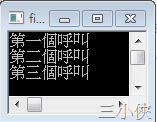
結果

tmp


sample4

實現 CallBack


//宣告委派型別
    public delegate string MyDel();

    class A {
        private string _name = "我是 A";

        //建立與委派型別對應的方法
        public string showInfo() {
            return this._name;
        }

        public A() {
            //建立委派驅動
            DelDriver dirver = new DelDriver();
            //建立委派實例並且指定方法
            MyDel d1 = showInfo;
            //呼叫驅動方法並且傳入委派物件
            dirver.delDirver(d1);
        }
    }

    class B {
        private string _name = "我是 B";

        //建立與委派型別對應的方法
        public string showInfo() {
            return this._name;
        }

        public B() {
            DelDriver dirver = new DelDriver();
            MyDel d1 = showInfo;
            dirver.delDirver(d1);
        }
    }

    class DelDriver {
        public void delDirver(MyDel del) {
            Console.WriteLine(del.Invoke());
        }
    }

    class Program {
        static void Main(string[] args) {
            A a = new A();
            B b = new B();

            Console.ReadKey();
        }
    }

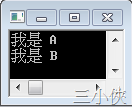
結果

tmp


sample5

利用 Lambda 運算式 完成委派,這個方法僅適用 .net 3.0 之後的版本。

Lambda 運算式」(Lambda Expression) 是一種匿名函式,它可以包含運算式和陳述式 (Statement),而且可以用來建立委派 (Delegate) 或運算式樹狀架構型別。

所有的 Lambda 運算式都會使用 Lambda 運算子 =>,意思為「移至」。Lambda 運算子的左邊會指定輸入參數 (如果存在),右邊則包含運算式或陳述式區塊。


 //宣告委派型別
        public delegate void Del(string m);

        static void Main(string[] args) {            
            //建立委派物件
            //大括號裡面為匿名方法,左方 s 變數對應匿名方法,傳入。
            Del oMyDel = (string s) => { Console.WriteLine(s); };
            oMyDel("Hello!");
            Console.ReadKey();
        }

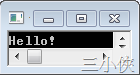
結果

三小俠


Link

委派 (C# 程式設計手冊)

HOW TO:宣告、產生和使用委派 (C# 程式設計手冊)

使用具名和匿名方法委派的比較 (C# 程式設計手冊)

使用委派取代介面的時機 (C# 程式設計手冊)

委派中的 Covariance 和 Contravariance (C# 程式設計手冊)

HOW TO:組合委派 (多點傳送委派) (C# 程式設計手冊)

Lambda 運算式 (C# 程式設計手冊)

匿名方法 (C# 程式設計手冊)


<<後記>>

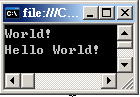
1. 使用委派建立執行緒參數

    class Program {
        static void Main(string[] args) {

            StartThread();
            StartThread2();
            Console.ReadKey();
        }

        static void StartThread() {
            //使用匿名方法,建立委派不具參數的委派
            System.Threading.Thread t1 = new System.Threading.Thread
             (delegate() {                
                System.Console.WriteLine("World!");
            });
            t1.Start();
            
        }

        static void StartThread2() {
            //使用匿名方法,建立帶有參數的委派
            System.Threading.Thread t1 = new System.Threading.Thread
              (delegate(object value) {
                System.Console.Write(value);
                    });
            t1.Start("Hello World!");
        }

    }


<<後記2>>

在網路上不小心發現 蔡學鏞 大師有介紹 C# 的函數指標,大家可以參考一下

函數指標的進化論 (上)
函數指標的進化論 (下)

資料來源:https://dotblogs.com.tw/atowngit/2009/12/07/12311